


LOADING
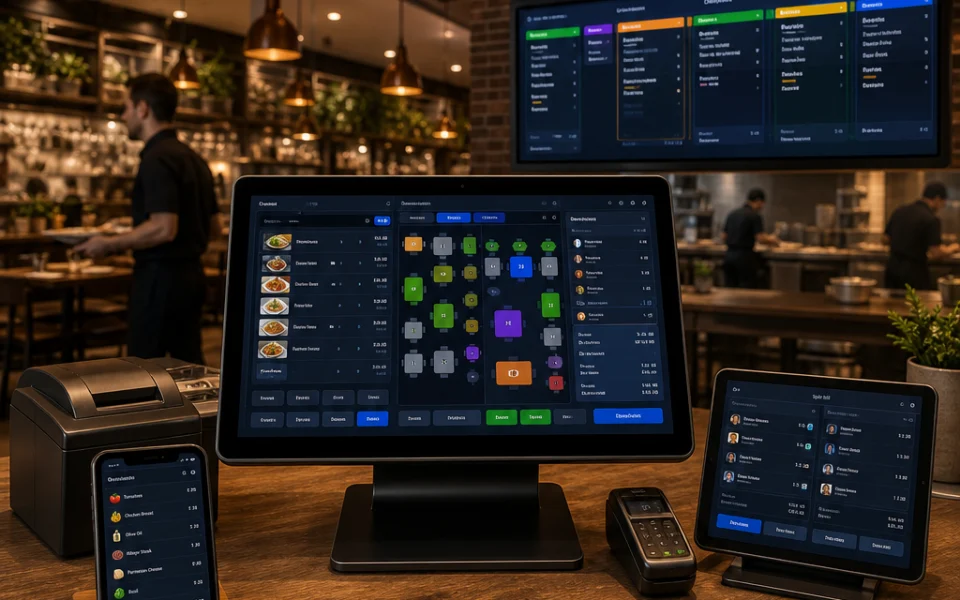
Restaurant Pro point of sale, table, kitchen and split-bill management
POS · Kitchen · Delivery · Reservations · Analytics

The Complete Restaurant Management Platform

One platform. Every outlet. Every order channel. Most restaurants run five disconnected tools — Restaurant Pro replaces all five.

  • POS & Billing
  • Kitchen Display
  • QR Self-Ordering
  • 0% Commission
  • Multi-Branch
Table 12 · Dine-in
Live
Burger · Large12.00
+ Extra cheese1.50
Cold coffee4.00
Total17.50
KOT sent to grillNo re-typing · instant
Rider assignedOrder #2214 · on route
Restaurant Owners Multi-Outlet Operators F&B Chains Cloud Kitchens Hotels & Resorts SaaS Resellers Restaurant Owners Multi-Outlet Operators F&B Chains Cloud Kitchens Hotels & Resorts SaaS Resellers
The Problem

Running a Restaurant Shouldn't Need Five Different Systems

How many systems do you touch between an order being placed and money in the bank?

Billing and Kitchen Disconnected

Bills on one system, kitchen still working off handwritten paper tickets.

Reservations in a Notebook

Bookings live on paper while delivery lives on aggregator dashboards.

No Single View

Sales, tables, staff and stock never line up in one place.

Day-End Takes Hours

Reconciling cash, COD and card at close eats your manager's evening.

A Second Outlet Doubles the Work

Every menu change, every price update, done twice — or three times.

Commission on Every Order

Aggregators take a cut — and keep the customer list you paid to build.

Introducing Restaurant Pro

One Platform From Table to Kitchen to Cash

Four pillars — Sell, Serve, Settle, Scale. Everything below fits into one of them.

Sell

Take the order from wherever the guest is.

POSQR Self-OrderWeb OrderingDelivery

Serve

Get it made and get it to the table.

Floor PlanKOT / KDSWaiter CallsPrinting

Settle

Collect the money and account for all of it.

PaymentsSplit BillsRefundsCOD

Scale

Run outlet two exactly like outlet one.

Multi-BranchRolesReportsPackages
Product at a Glance

Everything Included, Out of the Box

Front of house, kitchen, back office and growth — no modules to buy before you can open for service.

Front of House

POS / Billing Table & Area Plan Reservations Waiter Requests Customer Display Order Board

Kitchen

KOT Management Kitchen Display Print Stations Removed-Item Tracking Multi-Print Routing KOT Places

Back Office

13 Report Types Expenses Staff & Roles Taxes & Charges Payments & Refunds 45+ Settings Screens

Growth

Multi-Branch QR Ordering Customer Web Shop Delivery Executives Loyalty SaaS Packages
POS · Table 12
Burger · Large · Extra cheese13.50
Pasta · Half8.00
Cold coffee4.00
Payable25.50
Point of Sale

A POS Your Staff Learns in One Shift

This is the screen your team touches 500 times a day. Category → item → variation → modifier in three taps.

Touch-Optimised Billing
Search & Quick Shortcuts
Draft Orders — Park & Resume
Predefined Tender Amounts
Assign Table, Customer, Waiter
Live Order-Type Switching
Order Types & Channels

One Order Pipeline, Every Channel

The kitchen and the reports don't care where the order came from. One pipeline means one number at day-end.

Dine-in

Table-Linked

Sessions tracked from seating to settlement.

Pickup

Counter & Pre-Order

Takeaway handled without a queue.

Delivery

Own Riders or Platforms

Both land in the same order list.

Room Service

Stay-Linked Orders

Charged to the room, not the counter.

Custom

Define Your Own

With their own charges, taxes and rules.

Menu Item Editor
Classic BurgerSmall · Medium · Large
3 sizes
Modifier groupCheese · Bacon · Sauce
+3
TranslationsGuest-facing menu
Menu Management

Build Your Menu Once — Use It Everywhere

One item, three surfaces: the POS tile, the QR menu and the online shop. You don't type 400 items — you upload a sheet.

Multiple Menus & Categories
Variations & Modifier Groups
Per-Variation Pricing
Per-Item Tax Mapping
Multi-Price Across Branches
Item Translations
Bulk Import & Export
Printable PDF Menu
Tables & Reservations

Know the Status of Every Table, in Real Time

A reservation isn't a note in a book — it changes the live status of the table.

Ground Floor

Live
T1Occupied T2Free T3Reserved T4Bill due T5Free T6Occupied T7Free T8Reserved
T5 + T7 mergedParty of 9 · one settlement

Areas & Sections

Live Table Status

Table Sessions

Merge Tables

Unlock a Stuck Table

Per-Table QR Code

Reservations & Slots

Auto Table Linking on Arrival

Table-Wise Earnings

Table 12 · Menu
Classic Burger12.00
Margherita10.00
Pasta Alfredo9.50
Call a waiter
No app install
Guest Channels

Let Guests Order From Their Own Phone

Scan the table QR and the order drops straight into the same POS and kitchen pipeline as a walk-in. And your own storefront means online orders carry no commission.

QR Self-Ordering

Full menu with images, variations and live pricing — in the guest's own language.

Web Ordering Shop

Branded storefront with cart, checkout and order tracking — 0% commission.

OTP Customer Accounts

Saved addresses, order history, My Orders and My Bookings pages.

Display & Order Board

Guest-facing bill mirror plus a "Preparing / Ready" board on any spare screen.

Kitchen & Operations

The Kitchen Stops Guessing

Orders become KOTs automatically — routed to the right station, with every removed item logged.

Kitchen Display

Live KOT status by station
Live
Grill
Bar
Dessert
Main
14In Progress
6Ready
4Stations

A bar item shouldn't print at the grill

KOT Places route every item to the station that actually makes it — one order, three printers, no confusion.

Per-Station Routing Re-print

Auto KOT Creation

Orders become tickets with no re-typing.

Waiter Requests

Guest taps, waiter is notified instantly via Pusher.

Removed-Item Report

Cancel reasons captured — full wastage accountability.

Waiter Assignment

Assign or change the waiter on any order.

Split Bill · Table 12
Guest 1 · Burger13.50
Guest 2 · Pasta8.00
Guest 3 · Coffee4.00
3 receipts25.50
Grill printer Counter
Bills & Printing

However the Table Wants to Pay

Split-bill handling is where cheap POS systems fail. And when something doesn't print, the print log tells you why.

Split by Item or Amount
Merge Orders on One Table
Per-Order Discounts & Charges
Partial & Due Payments
Multi-Printer Routing
Print Queue & Print Log
Configurable Receipt Design
Desktop Print Bridge
Payments & Controls

Take Payment Any Way Your Guests Pay

Ten gateways built in, plus every offline method you define — and every refund accounted for.

Order #2214

Settled
CardGateway · captured
18.00
CashCounter · collected
7.50
Methods used2
Outstanding0.00

10 Online Gateways

Custom Offline Methods

Multi-Method on One Bill

Due-Payment Collection

Structured Refund Reasons

Cancellation Rules

Role-Gated Refunds

Method-Wise Earnings

Cancelled & Refund Reports

Stripe PayPal Mollie Razorpay Paystack Flutterwave PayFast Xendit Tap ePay Cash · Card · UPI · Wallet
Rider App
Order #2214On route
3.2 km · Tier 2 fee2.00
Cash to collect25.50
Delivery history
COD settledRider handover
Delivery & Cash

Run Your Own Delivery Fleet — Properly

A native rider app, not a web page in disguise. And if reconciliation takes your manager 45 minutes a night, that's 270 hours a year you get back.

Native iOS & Android Rider App
Executive Assignment & Tracking
Delivery Fee Tiers
Aggregator Orders in One List
COD Settlement per Rider
Who Is Holding How Much
Expense Tracking
COD & Delivery Reports
Platform Capabilities

Four pillars, one system

Sell, Serve, Settle, Scale — switch between them to see what each covers.

Sell

Take the order from anywhere

Counter, table, phone or website — five channels converge into one order pipeline before the kitchen ever sees it.

Touch POS with Draft Orders
QR Self-Ordering
Commission-Free Web Shop
Custom Order Types

Book a Demo

Order Channels
Dine-in · Table 12POS
Dine-in · Table 4QR
Delivery · #2214Web
One pipeline
Serve

Get it made, get it out

KOTs route themselves to the right station, the floor team is notified in real time, and every removed item is on record.

Kitchen Display System
KOT Places & Station Routing
Waiter Requests via Pusher
Removed-Item Accountability

Book a Demo

Kitchen Display
Burger · LargeGrill station
Draft beerBar station
GelatoDessert station
Settle

Every rupee accounted for

Split it, part-pay it, refund it with a reason — and settle rider cash at day-end without a spreadsheet.

Split Bills & Multi-Method Payment
Refund Reasons & Approvals
COD Settlement per Rider
Taxes, Charges & Loyalty

Book a Demo

Bill Breakdown
Subtotal25.50
Service charge2.55
Tax1.68
Discount-2.00
Loyalty redeemed-1.50
Payable26.23
Scale

Two outlets or twenty, same effort

Central menu with per-branch pricing, roles that lock down what each person sees, and consolidated reporting across every outlet.

Branch Management & Shifts
Module-Level Permissions
Consolidated Reporting
Central Menu, Local Pricing

Book a Demo

All Outlets
4Branches
13Report types
Dashboard & Reports

Your Restaurant, at a Glance

The dashboard answers three questions: how much today, what's selling, and what needs your attention.

Today & This Week

Live across every outlet
Live
248Orders Today
186Customers
13Report Types

Export anything

Sales, item, category, tax, expense, refund, COD, outstanding and removed-KOT reports — Excel or PDF on every one.

Excel PDF

Today's Earnings

With average daily earning and a weekly trend chart.

Earnings by Item

See what actually sells, ranked.

Earnings by Table

Which sections earn their floor space.

By Payment Method

Cash, card and gateway split at a glance.

Manage & Grow

Everyone Sees Exactly What They Should

Module-level permissions, branch-level settings and configuration deep enough that you won't need a feature request.

Staff, Roles & Permissions

A cashier simply cannot open reports. Build the role, assign the modules, done.

Module-Level Permissions
Custom Roles per Outlet
Waiter-Specific Views
Rider & Customer Portals

Multi-Branch & Outlets

Central menu with per-branch pricing — the classic chain requirement, handled.

Branch-Level Settings
Operational Shifts per Branch
Branch Delivery & Fee Tiers
Consolidated Reporting

Customers & Loyalty

Your customer list is the asset aggregators never hand over. Here, it's yours.

Customer Database & History
Multiple Saved Addresses
OTP Passwordless Login
Points & Stamp Rewards

Real-Time Updates

POS, kitchen and dashboards stay in sync via Pusher — no refreshing.

Web Push, Email & SMS

Per-event settings so the right person is told, not everyone.

45+ Settings Screens

Branding, receipts, order rules, hours — configured to your restaurant.

Multi-Language & Currency

Language packs, menu translations and timezone-aware reporting.

Optional Modules

Extend It When You Need It

Start lean and add later. Modules are licensed separately from the core platform.

Kitchen

Advanced kitchen display system.

Inventory

Stock levels, suppliers and reordering.

Cash Register

Full cash drawer and shift management.

Kiosk

Self-service ordering kiosk mode.

MultiPOS

Multiple POS terminals per location.

SMS

Automated SMS notifications.

Language Pack

Additional interface languages.

Subdomain

Per-tenant subdomains for SaaS.

Backup

Automated database backups.

Platform & Access

Works Where Your Team Works

Laravel + Livewire, PHP 8.2+, MySQL or PostgreSQL — self-hosted on your server, with your data.

Web App

Any modern browser, responsive to tablet.

PWA

Installable, with offline fallback.

Desktop App

Windows & macOS with local print bridge.

Rider App

Native iOS and Android.

API

Partner orders and print-job endpoints.

Laravel + Livewire PHP 8.2+ MySQL / PostgreSQL Self-Hosted USB Thermal Printers
Who It's For

Built for how you actually operate

One restaurant, twenty outlets, a delivery-only kitchen or a SaaS business built on top — same platform underneath.

Single Restaurant
248 orders today
KOTs auto-routed
Split bills handled
Single Restaurant

Replace Five Systems With One

POS, kitchen, reservations, billing and reporting stop being separate problems. Staff learn the POS in a single shift.

Fast Touch Billing
Paperless Kitchen Tickets
Split Bills That Work
13 Reports, All Exportable
All Branches
DowntownShift A · open
1,240
RiversideShift B · open
980
AirportLocal pricing
1,510
Multi-Outlet Chain

Two Outlets or Twenty, Same Effort

Update the menu centrally, price it locally, and read one consolidated report across every branch.

Central Menu, Local Pricing
Operational Shifts per Branch
Roles Scoped per Outlet
Consolidated Reporting
Delivery Ops
Rider · Sam3 orders out
76.50
Rider · Ana1 order out
22.00
Day-end settledCOD reconciled
Cloud Kitchen & Delivery-First

Your Orders, Your Riders, Your Margin

Take orders on your own storefront at 0% commission, dispatch your own fleet, and reconcile the cash in minutes.

Commission-Free Web Ordering
Native Rider App & Portal
Delivery Fee Tiers
COD Monitoring & Settlement
Superadmin
42Tenant restaurants
9Module entitlements
SaaS Operators & Resellers

Run Restaurant Pro as Your Own SaaS Business

Multi-restaurant tenancy with per-tenant isolation, packages with module-level entitlements, and a built-in landing site builder.

Packages & Plan Entitlements
Subscription Billing & Invoices
Self-Serve Restaurant Signup
Superadmin Revenue Dashboard

0%

Commission on your orders

13

Built-in report types

45+

Settings screens

9

Optional add-on modules

Why Restaurant Pro

What You Get That You Don't Get Elsewhere

The strongest close — six reasons operators pick this over a generic cloud POS.

Complete

POS, kitchen, delivery, reservations and reporting in one licence.

No Per-Order Commission

Your online orders — and the margin on them — stay yours.

Own Your Data

Self-hosted on your server, in your database.

Extensible

Nine add-on modules, an open API and custom order types.

Proven Stack

Laravel + Livewire, PHP 8.2+, MySQL or PostgreSQL.

One-Time Licence

Not a per-terminal monthly bill that grows with your success.

Getting Started

From Demo to Service in Days

We'll set it up with your own menu so the demo is your restaurant, not a sample one.

01

Live Demo

See one order run end-to-end — POS to kitchen to payment to report.

02

Install & Import

Installation wizard plus bulk menu import — you upload a sheet, not 400 items.

03

Staff Onboarding

Roles configured per person, with full documentation included.

04

Pilot, Then Roll Out

Start in your main outlet, then extend to the rest with support throughout.

Next Steps

Let's Get Your Restaurant on Restaurant Pro

One platform, every outlet, every order channel. Can we run a pilot in your main outlet next week?